Actor Pool System
Part of the Break of Day Technical Series
How It Started
When I was working on the rifle for The Break of Day, I wanted the weapon to feel futuristic but grounded in real firepower. It’s modeled after the M4A1 — a modern full-auto AR platform widely used around the world, and it fires roughly 900 rounds per minute — that’s fifteen bullets per second. Each bullet was a simple actor: a visual component, a collision box, some velocity. I hit play, held down fire, and saw a frame rate drop.
It wasn’t immediately obvious what was going on. I had to investigate and do some profiling before I realized that Unreal was trying to spawn, register, and destroy fifteen actors every second, each one going through the full lifecycle — memory allocation, component registration, collision setup, world bookkeeping — and that was eating up the performance.
I had to research the solution, which turns out to be a well-known (apparently not for me at that time) pattern: object pooling. If you want the canonical writeup, Robert Nystrom covers it in his Game Programming Patterns book (the object pool chapter is also available free online). What follows is how I applied it in Unreal.
The Concept
Object pooling is straightforward. Instead of spawning actors on demand and destroying them when they’re done, you pre-spawn a batch at level start and keep them hidden. When you need one, you pull it out, move it into position, and make it visible. When it’s done, you hide it and put it back. The actor lifecycle cost is paid once upfront, and after that it’s just toggling state.
The Implementation
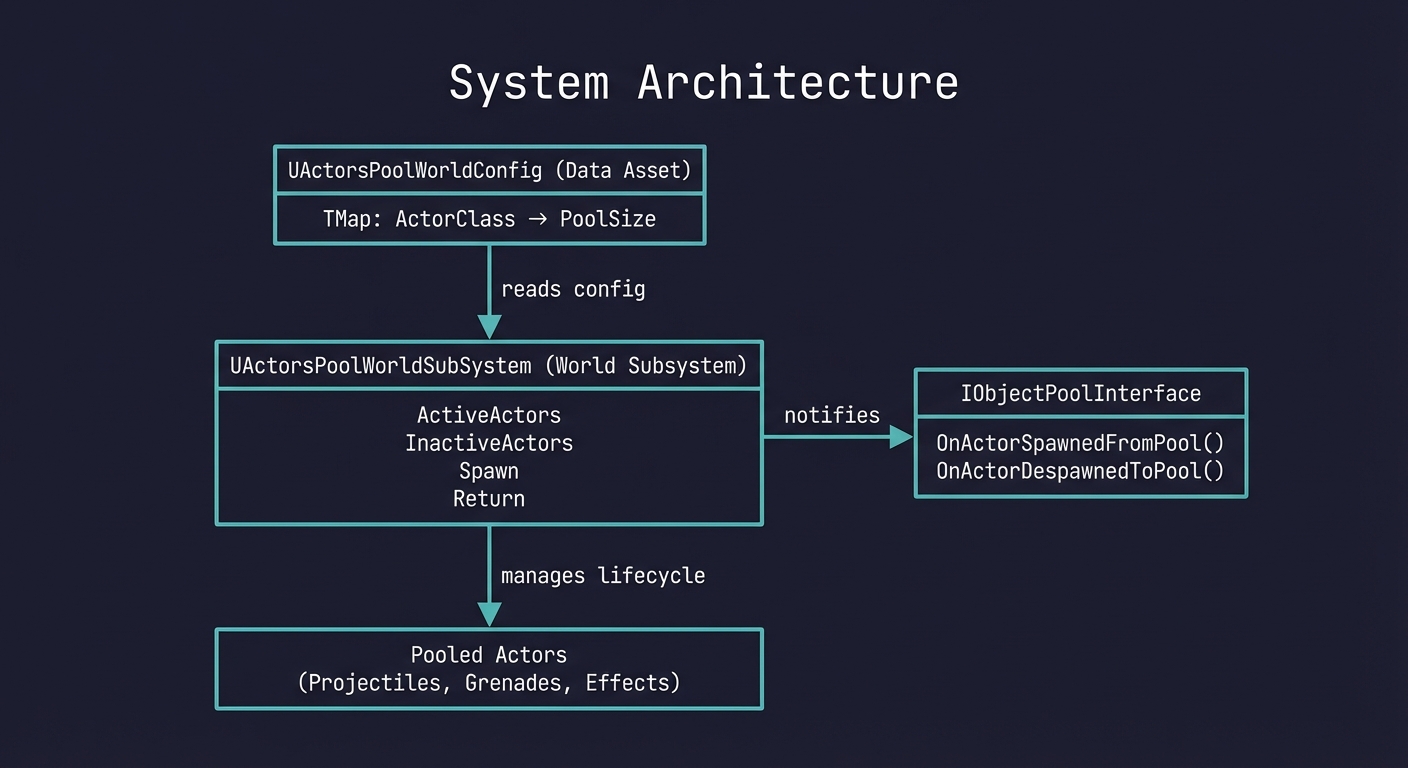
The system has three parts: a config asset, an optional interface, and a world subsystem that ties it all together.
The Config
UCLASS()
class UActorsPoolWorldConfig : public UDataAsset
{
    UPROPERTY(EditDefaultsOnly, BlueprintReadWrite)
    TMap<TSubclassOf<AActor>, int32> ActorsPoolSize;
};
This is a Data Asset with a single map — actor class to pool size. You add your projectile class, set the count to 50, and you’re done. Different levels can use different configs without any code changes, and designers can adjust pool sizes on their own.
The Interface
class IObjectPoolInterface
{
    UFUNCTION(BlueprintNativeEvent, BlueprintCallable)
    void OnActorSpawnedFromPool();

    UFUNCTION(BlueprintNativeEvent, BlueprintCallable)
    void OnActorDespawnedToPool();
};
This is optional. Any actor that implements this interface gets notified when the pool pulls it out or puts it back. The subsystem calls these via Execute_OnActorSpawnedFromPool / Execute_OnActorDespawnedToPool, so it works for both C++ and Blueprint implementations. A projectile might use OnActorSpawnedFromPool to reset its velocity and re-enable its trail particle. A grenade might reset its fuse timer. And since these are BlueprintNativeEvent, designers can override the behavior per Blueprint class without touching C++ — the base logic runs, and the Blueprint can extend it.
The Subsystem
UActorsPoolWorldSubSystem is a World Subsystem, which means it’s a singleton that exists for the lifetime of the level. No need to place anything in the scene or set up references — it’s just there.
It maintains two collections per actor class:
ActiveActors:   [ProjectileClass] → [bullet1, bullet2, bullet5]
InactiveActors: [ProjectileClass] → [bullet3, bullet4]
On level start, the subsystem reads the config and pre-spawns everything:
void UActorsPoolWorldSubSystem::OnWorldBeginPlay(UWorld& InWorld)
{
    for (auto KV : PoolConfig->ActorsPoolSize)
    {
        ActiveActors.Add(KV.Key, FActorArray());
        InactiveActors.Add(KV.Key, FActorArray());
        AddActorsToPool(KV.Key, KV.Value);
    }
}
Each pre-spawned actor gets put to sleep:
void UActorsPoolWorldSubSystem::SetPoolActorHidden(AActor* Actor, bool bNewHidden)
{
    Actor->SetActorHiddenInGame(bNewHidden);
    Actor->SetActorEnableCollision(!bNewHidden);
    Actor->SetActorTickEnabled(!bNewHidden);
}
Hidden, no collision, not ticking. A sleeping actor costs essentially nothing per frame. Bundling all three into one call matters — if you forget to disable collision on hidden actors, you get phantom hits from invisible projectiles.
When a weapon fires, it calls SpawnActorFromPool, which pops an actor off the inactive stack, teleports it to the spawn transform, sets owner and instigator for damage attribution, and wakes it up. If the actor implements the [[Interface (C++)|IObjectPoolInterface]], it gets notified.
There’s a SpawnActorIfPoolIsEmpty flag that falls back to regular spawning if you’ve exhausted the pool. The game never breaks — you just don’t get the pooling benefit for that actor. Better than a silent failure.
When a projectile hits something or times out, it goes back:
void UActorsPoolWorldSubSystem::ReturnActorToPool(
    TSubclassOf<AActor> PoolActorClass, AActor* Actor)
{
    SetPoolActorHidden(Actor, true);
    Actor->SetActorLocation(FVector::ZeroVector);
    ActiveActorsArray.Remove(Actor);
    InactiveActorsArray.Add(Actor);
    IObjectPoolInterface::Execute_OnActorDespawnedToPool(Actor);
    OnActorReturnedToPool.Broadcast(Actor);
}
The full spawn → fly → hit → return cycle happens without a single memory allocation.
What I Pool
In The Break of Day, I pool projectiles of various types — rifle bullets, shotgun pellets, rockets. A weapon grabs a projectile from the pool, sets its velocity and damage, and lets it fly. On hit, it returns itself.
Why a World Subsystem
I could have used an actor placed in the level, but a World Subsystem fits better here. It has automatic lifetime management — created with the level, destroyed with it. It’s globally accessible via GetWorld()->GetSubsystem<UActorsPoolWorldSubSystem>(). There’s nothing to place or forget to place. And all the key functions are BlueprintCallable, so designers can work with it directly.
The Blueprint Loading Configuration
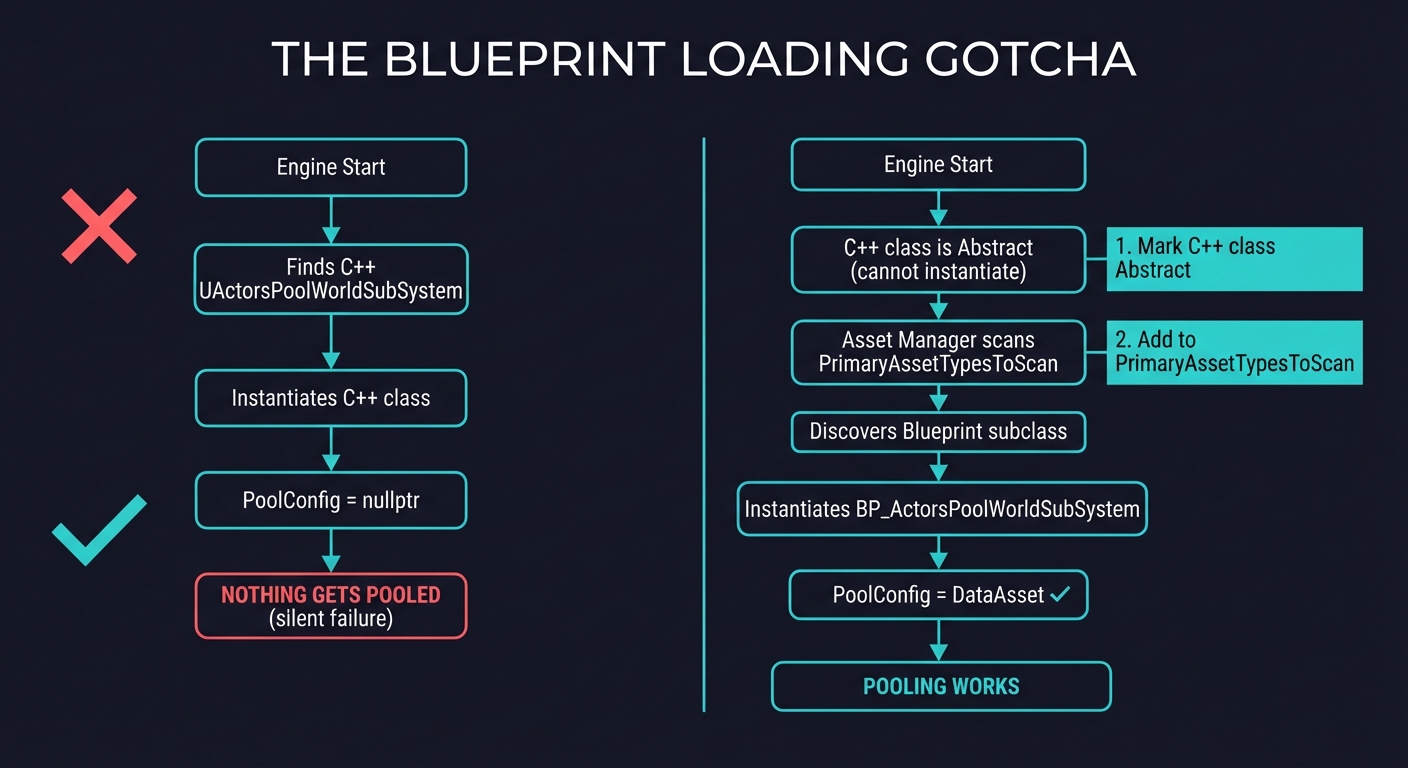
There’s one catch that cost me a few hours. The subsystem has a PoolConfig property — a reference to the Data Asset that defines pool sizes. You want to set that in the editor, which means you need a Blueprint subclass of the C++ subsystem. Easy enough: create a Blueprint that extends UActorsPoolWorldSubSystem, assign the config in Class Defaults.
But Unreal will still load the C++ class, not your Blueprint. Your config reference stays null, nothing gets pooled, and there’s no error — it just silently doesn’t work.
The fix has two parts. First, mark the C++ class as Abstract:
UCLASS(Abstract, Blueprintable)
class UActorsPoolWorldSubSystem : public UWorldSubsystem
This prevents the engine from instantiating the C++ version directly. Then, in Project Settings under Asset Manager, add a PrimaryAssetTypesToScan entry that points to your Blueprint subclass:
PrimaryAssetType: "UActorsPoolWorldSubSystem"
AssetBaseClass: /Game/.../ActorsPoolWorldSubsystem_BP_C
bHasBlueprintClasses: True
SpecificAssets: /Game/.../ActorsPoolWorldSubsystem_BP
This tells the Asset Manager to discover and preload the Blueprint class at startup, so Unreal instantiates it as the world subsystem instead of the abstract C++ base. It’s not something you’d guess from documentation — I found it by trial and error.
A Postscript on Fire Rates
With the pool system in place, the rifle ran at full 900 RPM without any issues. Smooth framerate, no allocation spikes. But playing with it, I realized that emptying a 30-round magazine in two seconds doesn’t actually feel powerful — it’s over so fast the player can barely register what happened. So I ended up lowering the fire rate anyway, for a completely different reason than what started this whole exercise.